Step-by-Step: Ordering Web Hosting
Reliable web hosting is the foundation of your website. Our ordering process is transparent and takes just a few minutes.
Step 1: Choose the Right Plan
Visit our Web Hosting Offers. Compare our plans (e.g., Starter, Professional, Enterprise). Click "Order Now" on your preferred package.

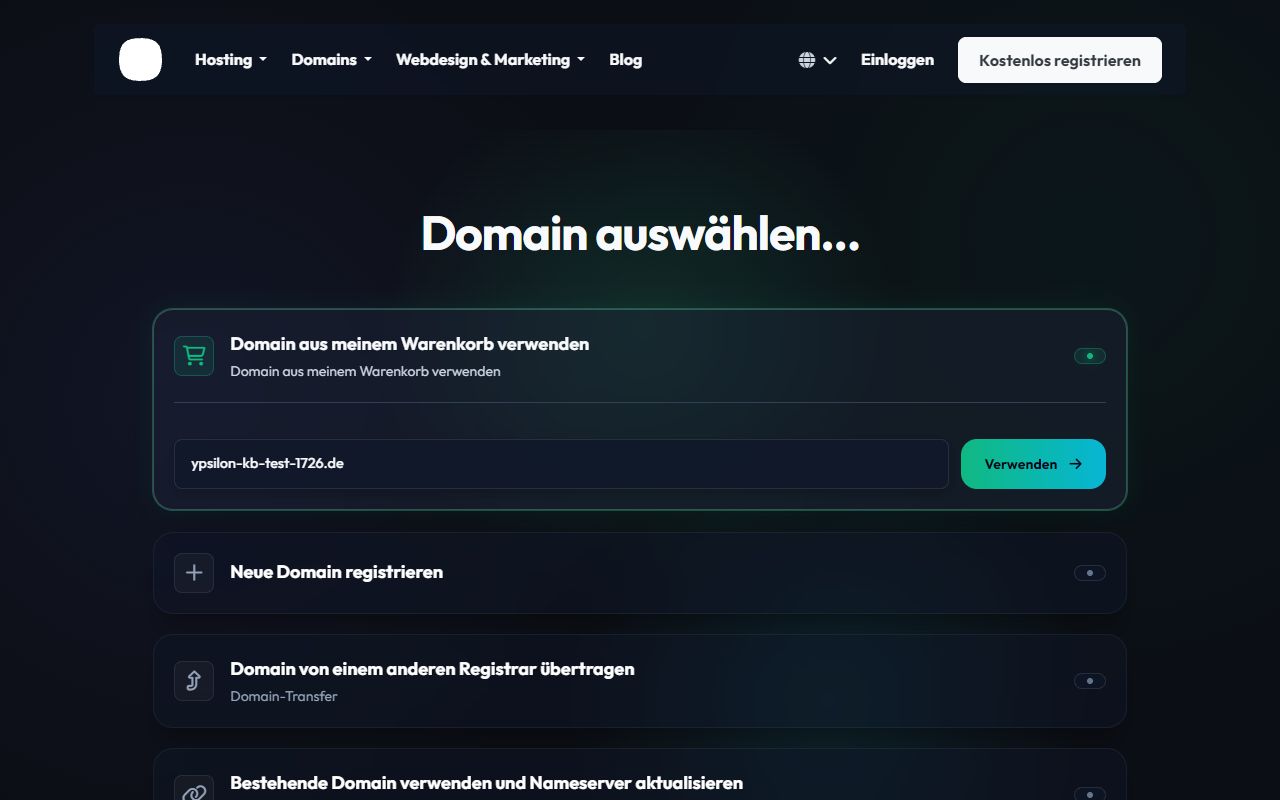
Step 2: Domain Selection
Every web hosting plan requires a domain. You have three options here:
- Register a new domain: Search for a completely new domain.
- Transfer your domain: Transfer an existing domain to us.
- Use an existing domain: You will update your existing domain\'s nameservers yourself later.
Step 3: Plan Configuration
Choose your billing cycle (monthly, annually, etc.). The longer the selected period, the more you benefit from discounts. You can also add any additional services here.
Step 4: Order Summary
The cart summary gives you a transparent view of all selected products, taxes, and total costs.

Complete the purchase by clicking the Checkout button. Immediately after payment is received, your web hosting account is automatically provisioned on our servers and you will receive your login details via email.
